
You’ve been staring at a basic chair and a cluttered desk long enough. If you’re serious about upgrading your setup — monitors, ergonomics, and all — you’re in the right place. These five gaming chairs don’t just hold a monitor; they reshape how you work and play entirely. Now, the options vary wildly in size, features, and price, so stick around — the right pick for you is in here.
| Imperator GM-520 Zero Gravity Gaming Chair Workstation |  | Best for Heavy Users | Monitor Support: Up to three 32-in monitors; optional bracket for 55-in Odyssey Ark | Recline Range: Up to 165° | Weight Capacity: 570 lb | VIEW LATEST PRICE | Read Our Analysis |
| Imperatorworks IW 320 Racing Gaming Chair for Multi-Monitors | 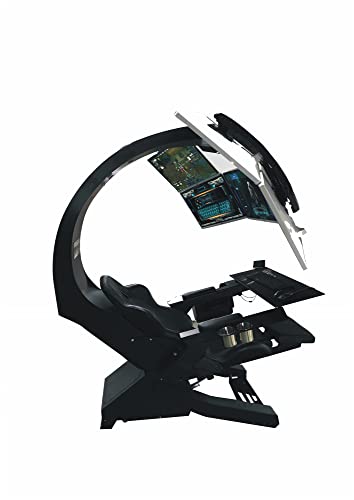 | Best Value | Monitor Support: Single 49-in ultrawide, up to three or five 32-in monitors | Recline Range: One-click zero-gravity recline | Weight Capacity: 53 lb max load (monitor arm); user capacity not listed | VIEW LATEST PRICE | Read Our Analysis |
| Luxury Ergonomic Racing Gaming Chair with Hanging Screens |  | Most Feature-Rich | Monitor Support: Single 49-in ultrawide or three 32-in curved screens | Recline Range: Up to 170° electric tilt | Weight Capacity: 170 kg (375 lb) | VIEW LATEST PRICE | Read Our Analysis |
| Zero-Gravity Gaming & Office Chair with Dual Monitor |  | Best Compact Pick | Monitor Support: Dual 27-in monitors via robotic arms | Recline Range: 90° upright to 148° zero-gravity | Weight Capacity: 80 kg (176 lb) frame rated | VIEW LATEST PRICE | Read Our Analysis |
| Imperator IW-R1 PRO Zero Gravity Gaming Chair Workstation |  | Best Overall | Monitor Support: Up to three 32-in; 49-in ultrawide; 43-in; optional 55-in Odyssey Ark or five 32-in | Recline Range: Up to 137° | Weight Capacity: 300 lb user / 410 lb max | VIEW LATEST PRICE | Read Our Analysis |
More Details on Our Top Picks
Imperator GM-520 Zero Gravity Gaming Chair Workstation
If you’re a heavy user who needs a chair built like a tank, the Imperator GM-520 doesn’t mess around. We’re talking 570-pound weight capacity, alloy steel frame, and memory-foam leather seating — this thing is engineered for serious sessions. You get three 32-inch monitor brackets included, plus optional support for a 55-inch Odyssey Ark. Now, here’s the thing — it reclines to 165 degrees and features adjustable foot pedals, so you’re genuinely lounging while working. Obviously, it’s massive. At 620 pounds assembled, you’re committing to a spot. But if you want a full cockpit experience, this one’s built exactly for you.
- Monitor Support:Up to three 32-in monitors; optional bracket for 55-in Odyssey Ark
- Recline Range:Up to 165°
- Weight Capacity:570 lb
- Frame Material:Powder-coated alloy steel
- Seat Upholstery:Leather with memory-foam fill
- Overall Dimensions:68 in D × 44 in W × 92 in H
- Additional Feature:Up to 165° recline
- Additional Feature:570 lb weight capacity
- Additional Feature:Supports 55″ Odyssey Ark
Imperatorworks IW 320 Racing Gaming Chair for Multi-Monitors
Serious multi-monitor rigs get serious value here — the Imperatorworks IW-320 packs a surprising amount of capability into its price point. You’re getting support for up to five 32-inch monitors, a single 49-inch ultrawide, or anything in between — that’s genuinely flexible. Here’s the thing: the leather vibration-massage seat and one-click zero-gravity recline aren’t just gimmicks; they’re real relief during long sessions. The remote controller added in 2024 keeps everything within arm’s reach. This one’s for you if you’re building a serious multi-monitor workstation and want comfort baked in without hunting for a separate massage pad.
- Monitor Support:Single 49-in ultrawide, up to three or five 32-in monitors
- Recline Range:One-click zero-gravity recline
- Weight Capacity:53 lb max load (monitor arm); user capacity not listed
- Frame Material:Alloy steel
- Seat Upholstery:Leather with polyurethane foam fill
- Overall Dimensions:40 in D × 22 in W × 62 in H
- Additional Feature:One-click zero-gravity recline
- Additional Feature:Vibration massage seat
- Additional Feature:Remote controller included
Luxury Ergonomic Racing Gaming Chair with Hanging Screens
You want the most feature-rich gaming chair money can buy, and CAUSSO’s “Charles” delivers exactly that. We’re talking hand-crafted 3/16-inch high-carbon steel, PU leather, electric adjustments hitting 170° recline, and built-in RGB lighting you control remotely. It supports three 32-inch curved screens or one 49-inch ultrawide. Now, here’s the thing — it’s big. At 210 × 112 × 155 cm and 170 kg capacity, this isn’t subtle furniture. It’s a cockpit. Obviously, this isn’t for small apartments. But if you’ve got the space and the budget, you’re not buying a chair — you’re buying a command center.
- Monitor Support:Single 49-in ultrawide or three 32-in curved screens
- Recline Range:Up to 170° electric tilt
- Weight Capacity:170 kg (375 lb)
- Frame Material:Powder-coated 3/16-in high-carbon steel
- Seat Upholstery:PU faux leather with leather-filled foam cushioning
- Overall Dimensions:210 × 112 × 155 cm (standard); 210 × 112 × 200 cm (extended)
- Additional Feature:Built-in RGB LED lighting
- Additional Feature:Electric height/tilt adjustment
- Additional Feature:Built-in I/O connectivity
Zero-Gravity Gaming & Office Chair with Dual Monitor
Small space, massive setup — the Ycloroet Mini Pod is your compact command center if you’re cramped on square footage but refuse to sacrifice dual-monitor functionality. Here’s the thing: dual robotic arms hold two 27-inch monitors stable at any angle, and a single lever tilts you from upright to 148-degree zero-gravity. Obviously, that’s serious recline territory. You also get a sliding keyboard tray and adjustable lumbar support built in. The 80 kg steel-iron frame survived 10,000-plus motion cycles, so wobbling isn’t your problem. This one’s for you if you want a full workstation without surrendering half your room.
- Monitor Support:Dual 27-in monitors via robotic arms
- Recline Range:90° upright to 148° zero-gravity
- Weight Capacity:80 kg (176 lb) frame rated
- Frame Material:Steel-iron metal
- Seat Upholstery:Polyurethane foam seat
- Overall Dimensions:57.09 in D × 31.5 in W × 60 in H
- Additional Feature:Sliding keyboard tray
- Additional Feature:10,000+ cycle tested
- Additional Feature:Single-lever recline control
Imperator IW-R1 PRO Zero Gravity Gaming Chair Workstation
If “go big or go home” is your setup philosophy, the IW-R1 PRO sits at the top of the pile. This thing weighs 400 pounds and holds three monitors, so obviously it’s not for everyone. Here’s the thing — it’s built for the person tired of cobbling together a setup from five different products. You get triple monitor brackets, four USB 3.0 ports, HDMI 2.1 and DisplayPort 1.4 cables pre-wired in, and a 35-inch keyboard tray. It reclines to 137 degrees. Assembly’s required, and it’s heavy. But if you want one complete cockpit, this is your answer.
- Monitor Support:Up to three 32-in; 49-in ultrawide; 43-in; optional 55-in Odyssey Ark or five 32-in
- Recline Range:Up to 137°
- Weight Capacity:300 lb user / 410 lb max
- Frame Material:Powder-coated alloy steel
- Seat Upholstery:Leather with foam fill
- Overall Dimensions:69 in L × 69 in W × 65 in H
- Additional Feature:4× USB 3.0 armrest ports
- Additional Feature:Pre-wired HDMI/DisplayPort cables
- Additional Feature:35″×15″ keyboard tray
Factors to Consider When Choosing a Gaming Chair With Monitor
Picking the right gaming chair with a monitor isn’t just about what looks cool in a setup tour — it’s about whether it actually fits your body, your space, and the way you game for hours at a stretch. You’ll want to check monitor compatibility and support first, since not every arm system handles ultrawide or multi-monitor rigs the same way, and then weigh that against ergonomic adjustability, weight capacity, recline range, and how cleanly the whole thing manages your cables. Here’s the thing — getting all five of those factors right for *your* setup is what separates a chair you love from one you’re quietly resenting three weeks after unboxing.
Monitor Compatibility and Support
Before you commit to any gaming chair with a built-in monitor arm, the first thing you need to nail down is whether that arm can actually hold your screen — because nothing kills the vibe faster than realizing your ultrawide won’t mount properly after the chair’s already been assembled.
Here’s the thing — VESA patterns matter. Your monitor’s rear holes need to match the arm’s pattern, typically 75×75 mm or 100×100 mm. Now, weight capacity‘s equally critical; arms generally handle 20 lb for a single ultrawide up to 57 lb for multiple 32-inch screens. Obviously, bigger setups need more range. Confirm the arm’s horizontal travel supports your configuration — three 32-inch monitors push around 83 cm wide. Get this right first, then everything else falls into place.
Ergonomic Comfort and Adjustability
Once you’ve locked in monitor compatibility, ergonomics become the next thing that’ll make or break your setup — because a chair that holds your screens perfectly but wrecks your back after two hours isn’t a gaming chair, it’s just an expensive torture device.
Here’s the thing — you want adjustable seat height, backrest tilt, and lumbar support that keeps your spine neutral during long sessions. A 165°–170° recline hits near zero-gravity, spreading your weight evenly and easing disc pressure. Memory-foam cushioning conforms to your body, preventing that annoying numbness. Multi-directional armrests keep your shoulders relaxed and aligned with your desk. Now, if circulation’s your issue, integrated footrests genuinely help.
Obviously, not every feature suits everyone — but if back pain’s already a problem, prioritize lumbar adjustability first.
Weight Capacity and Durability
Weight capacity isn’t the most glamorous spec to obsess over, but if you’re stacking a chair with one or two monitors plus all the hardware holding them up, it absolutely matters — because a frame that’s borderline on weight ratings today is a structural failure waiting to happen six months from now. Here’s the thing: you need to add up your body weight, the monitors, and every bracket and accessory attached. All of that lands on that frame simultaneously. Choose chairs built from alloy or high-carbon steel — they resist deformation under sustained heavy loads. Look for reinforced legs, heavy-duty locking casters, and wide bases that distribute weight across multiple points instead of stressing one spot. Obviously, the monitor arm’s weight rating matters too — make sure it’s anchored into genuinely solid structural components, not afterthoughts.
Connectivity and Cable Management
Here’s the thing — the right chair handles this before it becomes your problem. Look for built-in USB ports that eliminate extra power strips entirely. Integrated cable routing channels keep your HDMI, DisplayPort, and Ethernet cables away from foot traffic. Pre-wired monitor arms with USB-C connectors mean zero external adapters. Obviously, a keyboard tray with cable slots helps too.
Now, check power specs carefully — mismatched voltage on motorized features overloads fast. Get these details right upfront, and your setup practically runs itself.
Recline Range and Positions
If you’ve ever craned your neck trying to watch a movie from a fully upright gaming chair, you already understand why recline range matters more than most buyers realize. Here’s the thing — chairs capping out around 148° quietly rob you of true zero-gravity positioning, where your spine actually decompresses. You want something reaching 150°–165°, because that’s where body weight distributes across the backrest properly, taking real pressure off your lower back.
Now, range alone isn’t enough. You need lockable positions throughout that range, so you’re not constantly fighting the mechanism at your ideal monitor angle.
Obviously, a full 90°–165° sweep gives you the most flexibility — upright for intense sessions, reclined for passive watching. If you’re buying once and buying right, prioritize that full range.
Space and Size Requirements
Before you fall in love with a chair-and-monitor combo online, grab a tape measure — because the floor space reality check hits hard once the box arrives. These setups aren’t small. You’re looking at a footprint around 68 by 44 inches, plus extra clearance when the chair reclines up to 165°. Obviously, low ceilings and overhead light fixtures become problems fast. Now, if you’re running three 32-inch screens, your horizontal space needs stretch past 120 inches — that’s basically a dedicated wall. Here’s the thing: your seat depth alone can hit 22 inches, so legroom matters more than people expect. Measure your space twice, buy once. If everything fits comfortably on paper, it’ll feel even better in person.

I’m Michael K. Gibbs, an Engineer with a passion for finding solutions to people’s problems. After completing my bachelor’s degree in Computer Science and Engineering, I decided to start the Best Chair Hub site. My mission is to help people of all ages find the best chair for their posture and make sitting more comfortable and enjoyable. With my expertise and knowledge, I’m committed to helping everyone find the perfect chair for their needs.